從採用的 AI 模型、10 種功能模式,到關鍵字通知、懸浮字幕與字幕轉發——這裡是 jt-live-whisper 的完整功能地圖。From the AI models and 10 modes to keyword alerts, overlay subtitles and forwarding — the complete feature map.
所有模型皆在自有設備上推論(本機或區網內的 GPU 伺服器),不需要任何第三方雲端 API。Every model runs on your own hardware (local or a LAN GPU server) — no third-party cloud API.
| 用途Purpose | AI 模型Model | 說明Notes |
|---|---|---|
| 語音辨識 (ASR)ASR | whisper.cpp | macOS 即時辨識引擎,支援中日英文,可在本機或 GPU 伺服器執行macOS live engine; ZH/JA/EN; local or GPU server |
| 語音辨識 (ASR)ASR | faster-whisper (CTranslate2) | Windows 即時辨識 + 全平台離線處理,支援 VAD 靜音過濾Windows live + all-platform offline; VAD silence filtering |
| 語音辨識 (ASR)ASR | mlx-whisper | Apple Silicon GPU 加速,雙向模式(en_zh / ja_zh)即時辨識專用Apple Silicon GPU; for bidirectional live modes |
| 語音辨識 (ASR)ASR | Moonshine (Useful Sensors) | 超低延遲串流辨識模型,英文專用(僅限 Apple Silicon)Ultra-low-latency streaming, English only (Apple Silicon) |
| 翻譯 / 摘要Translate / summary | 自架 LLM 伺服器(推薦 Qwen / Phi-4 / GPT-OSS)Self-hosted LLM (Qwen / Phi-4 / GPT-OSS) | 透過地端 Ollama 或其他 LLM 伺服器,翻譯建議 14B 以上、摘要建議 120B 以上Via local Ollama or other servers; ≥14B for translation, ≥120B for summaries |
| 翻譯 (離線)Translate (offline) | NLLB 600M (Meta) | 離線翻譯,支援中日英互譯(en2zh / zh2en / ja2zh / zh2ja)Offline ZH/JA/EN translation |
| 翻譯 (離線備援)Translate (fallback) | Argos Translate | 完全離線的輕量翻譯模型,僅支援英翻中Fully offline, lightweight; English→Chinese only |
| 講者辨識Diarization | resemblyzer + spectralcluster | 聲紋特徵提取 + 頻譜分群,可在本機或 GPU 伺服器執行Voice embeddings + spectral clustering; local or GPU server |
為什麼講者辨識不用 pyannote.audio? pyannote 的預訓練模型授權限制了用途與場景,且需要在 HuggingFace 註冊帳號、申請存取權限並設定 Token 才能下載。這不符合本工具「零帳號、零註冊、完全地端」的設計理念。resemblyzer + spectralcluster 完全開源、安裝即用、無需任何帳號或 Token。 Why not pyannote.audio for diarization? Its pretrained models carry usage restrictions and require a HuggingFace account, access request and token. That clashes with the project's "no account, no signup, fully on-device" principle. resemblyzer + spectralcluster are fully open source and work out of the box.
單向翻譯、雙向翻譯、純轉錄、純錄音,滿足各種使用場景。One-way, bidirectional, transcription-only and record-only — for every scenario.
所有即時轉錄模式加上 --mic 即可同時轉錄自己的麥克風語音,雙向模式則自動啟用雙路辨識。Add --mic to any live transcription mode to also transcribe your microphone; bidirectional modes enable dual-stream automatically.
辨識與翻譯都有多種引擎可選,依場景與硬體自由搭配。Choose recognition and translation engines to fit your scenario and hardware.
程式會自動偵測 LLM 伺服器類型,不需手動選擇。The app auto-detects the server type — no manual selection.
| 伺服器Server | 預設 PortDefault port | API |
|---|---|---|
| Ollama | 11434 | Ollama 原生Ollama native |
| LM Studio | 1234 | OpenAI 相容OpenAI-compatible |
| Jan.ai | 1337 | OpenAI 相容OpenAI-compatible |
| vLLM | 8000 | OpenAI 相容OpenAI-compatible |
| LocalAI / llama.cpp | 8080 | OpenAI 相容OpenAI-compatible |
| LiteLLM | 4000 | OpenAI 相容OpenAI-compatible |
把即時翻譯變得更實用的那些細節。The details that make live translation genuinely useful.
所有即時模式加上 --mic 即可同時轉錄自己的麥克風語音,雙向模式自動啟用。Add --mic to any live mode to also transcribe your own voice; auto-on for bidirectional.
可指定會議主題(如「ZFS 儲存管理」),讓 LLM 依領域上下文精準翻譯專業術語。Set a meeting topic (e.g. "ZFS storage") so the LLM translates domain jargon accurately.
支援 Ollama、LM Studio、Jan.ai、vLLM、LocalAI、llama.cpp、LiteLLM,自動辨識伺服器類型。Detects Ollama, LM Studio, Jan.ai, vLLM, LocalAI, llama.cpp and LiteLLM automatically.
新手友善的選單介面,進階用戶可用命令列參數直接啟動;選單最後顯示等效 CLI 指令。A beginner-friendly menu, or launch directly via CLI — the menu prints the equivalent command.
--webui 在瀏覽器操作所有功能,支援即時字幕、離線處理、講者辨識、摘要,手機 / 平板也可使用。--webui drives everything in the browser — live, offline, diarization, summaries — phone/tablet friendly.
即時模式可加 --denoise 啟用背景降噪,提升嘈雜環境的辨識品質。Add --denoise in live mode to clean up noisy environments before recognition.
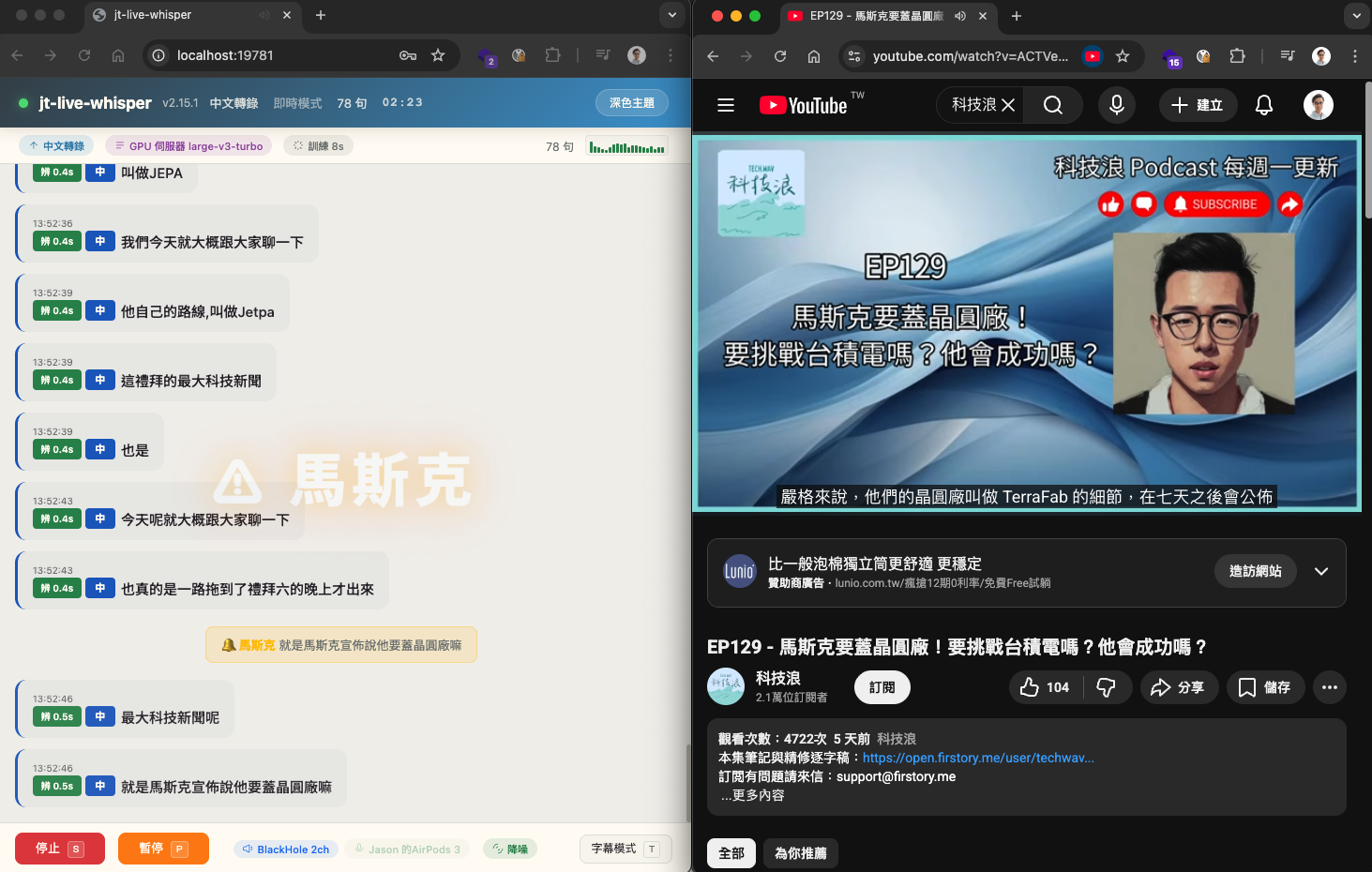
設定關鍵字,即時辨識出現時自動發出通知,可用於追蹤會議重點,或線上課程摸魚時讓系統在「請實作」「這個會考」時自動提醒。支援全螢幕警示特效、瀏覽器推播、音效提示(警示 / 柔和可選)、懸浮字幕閃爍,同一關鍵字冷卻機制避免重複通知。Set keywords and get notified the moment they're spoken — track key topics, or get pinged on "let's implement this" / "this is on the exam". Full-screen effects, browser push, sound (alert / soft), overlay flashing, and a per-keyword cooldown.
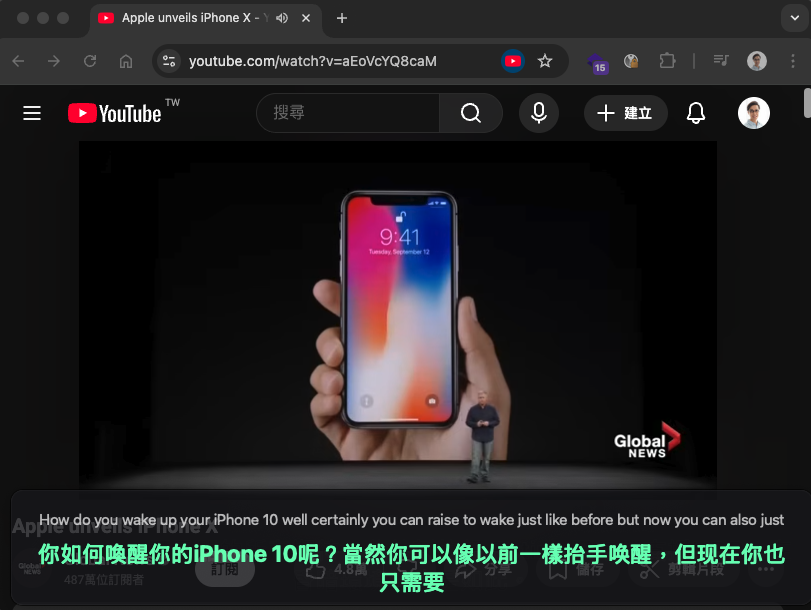
桌面半透明字幕覆蓋視窗(PyQt6),可疊加於任何應用程式上方。字體依視窗大小自動縮放、可拖曳移動與調整大小、滑鼠穿透模式、字幕切換淡入淡出動畫,單語 / 雙語自動切換高度。(感謝 OSSLab 熊大提供建議)A translucent desktop overlay (PyQt6) over any app — auto-scaling text, drag & resize, click-through, fade animations and auto height for mono/bilingual lines.
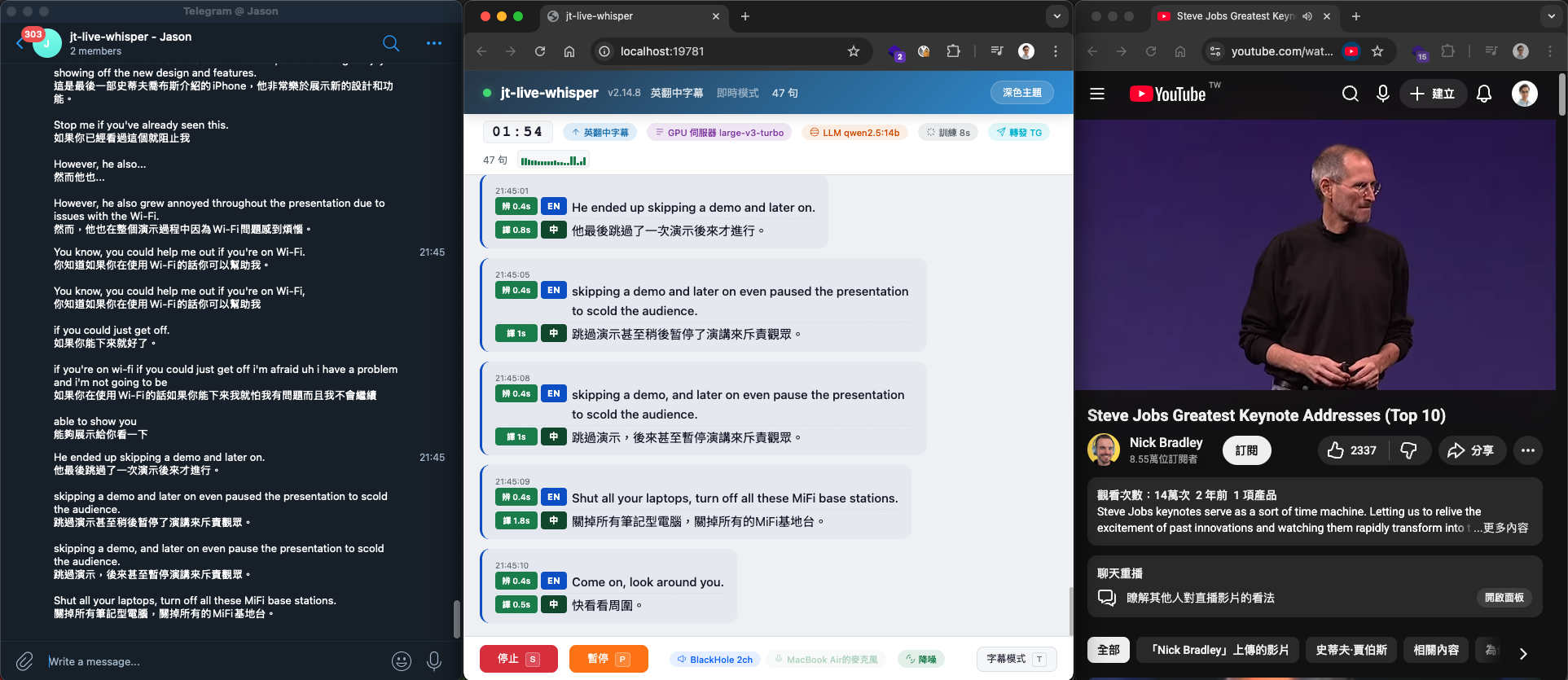
即時字幕自動轉發到通訊平台(Telegram / Slack / Discord / Teams / LINE / Nextcloud Talk / 通用 API),可同時啟用多個平台、自訂發送間隔與內容(含時間 / 原文 / 譯文)。通用 API 支援 Body 範本({{text}} 變數)搭配自訂 Headers。Forwards live subtitles to Telegram / Slack / Discord / Teams / LINE / Nextcloud Talk / a custom API — multiple at once, with custom intervals and content. The custom API supports a body template ({{text}}) with custom headers.
離線處理的產物,都存於 logs/<session>/。Offline processing writes everything to logs/<session>/.
| 檔案File | 說明Description | 需要 LLMNeeds LLM |
|---|---|---|
時間逐字稿_*.txt | 帶時間戳逐字稿(翻譯模式含原文 + 譯文)Timestamped transcript (source + translation in translate modes) | 校正需要for correction |
時間逐字稿_*.html | 互動式逐字稿(點時間戳可播放音訊)Interactive transcript (click timestamps to play) | 校正需要for correction |
時間逐字稿_*.srt | SRT 字幕檔SRT subtitles | 否No |
時間逐字稿_*.vtt | WebVTT 字幕檔WebVTT subtitles | 否No |
摘要_*.txt | AI 重點摘要 + 校正逐字稿AI summary + corrected transcript | 是Yes |
摘要_*.html | AI 摘要 HTML(含樣式與相關檔案連結)AI summary HTML (styled, with links) | 是Yes |
有設定 LLM 伺服器時,逐字稿會自動經過 LLM 校正(修正 ASR 辨識錯字),純轉錄模式同樣支援。With an LLM server configured, transcripts are auto-corrected by the LLM (fixing ASR typos) — including transcription-only modes.
取決於所選 ASR 模型大小、音訊品質(背景噪音、麥克風距離、多人重疊)以及語言種類。Depends on model size, audio quality (noise, mic distance, overlap) and language.
取決於翻譯引擎與模型能力。LLM 最佳但需伺服器;NLLB / Argos 離線品質較低但無需伺服器。Depends on engine and model. LLM is best (needs a server); NLLB / Argos are offline but lower quality.
受音訊品質、講者數量與聲紋相似度影響,多人交談或遠場收音時可能不準。Affected by audio quality, speaker count and voice similarity; crosstalk and far-field hurt accuracy.
取決於硬體算力(CPU / GPU)與模型大小。GPU 伺服器可大幅加速;純 CPU 較慢。Depends on hardware (CPU/GPU) and model size. A GPU server is much faster; CPU-only is slow.
免責聲明:本工具按「現狀」(AS IS)提供,不附帶任何明示或暗示的保證。語音辨識、翻譯、講者辨識及摘要等功能的輸出僅供參考,不保證準確性與完整性。使用者應自行驗證輸出,不應將未經人工審核的輸出直接用於法律文件、醫療紀錄、財務報告或其他需要高度準確性的場合。使用者應確保擁有合法錄音權利並遵守當地隱私法規。作者及貢獻者不對因使用本工具而產生的任何損害承擔責任。 Disclaimer: Provided "AS IS" without warranty of any kind. Recognition, translation, diarization and summary outputs are for reference only and are not guaranteed to be accurate or complete. Verify outputs yourself; do not use unreviewed output for legal, medical, financial or other high-stakes purposes. Ensure you have the legal right to record and comply with local privacy laws. The author and contributors are not liable for any damages arising from use.