jt-pve-storage-netapp
NetApp ONTAP SAN/iSCSI/FC Storage Plugin for Proxmox VE NetApp ONTAP SAN/iSCSI/FC Proxmox VE 儲存外掛程式
Enterprise SAN storage integration for Proxmox VE using NetApp ONTAP REST API. Supports iSCSI and Fibre Channel with multipath, snapshots, FlexClone, live migration, and automatic device lifecycle management. 透過 NetApp ONTAP REST API 將企業級 SAN 儲存整合至 Proxmox VE。支援 iSCSI 及 Fibre Channel,具備 multipath、快照、FlexClone、即時遷移,以及自動裝置生命週期管理。
Disclaimer 免責聲明
- This plugin is provided "AS IS" without warranty of any kind. 本 plugin 以「現況」提供,不附帶任何形式的保證。
- iSCSI protocol has been tested but not extensively in production environments. iSCSI 協定已經過實際客戶環境測試,但尚未大規模驗證。
- FC (Fibre Channel) protocol has NOT been fully verified. FC (Fibre Channel) 協定尚未完全驗證。
- Always test thoroughly in a non-production environment before deployment. 部署前請務必在非正式環境中徹底測試。
- Back up your data regularly and have a recovery plan in place. 請定期備份資料,並準備好復原計畫。
Features 功能特性
Complete SAN storage integration leveraging NetApp ONTAP enterprise capabilities. 完整的 SAN 儲存整合,充分運用 NetApp ONTAP 企業級功能。
--content images,rootdir.
容器 rootfs 可放在 NetApp LUN 上。以 --content images,rootdir 設定。
Requirements 系統需求
Proxmox VE
| PVE Version | Storage API | Compatibility 相容性 |
|---|---|---|
| PVE 9.1+ | 13 | Supported 支援 |
NetApp ONTAP
- ONTAP 9.8 or later (REST API required) ONTAP 9.8 或更新版本(需 REST API)
- iSCSI or FC license enabled 已啟用 iSCSI 或 FC 授權
- SVM with iSCSI/FC service enabled and at least one data LIF configured SVM 已啟用 iSCSI/FC 服務,且至少設定一個 data LIF
- Aggregate with available space Aggregate 有可用空間
- User account with REST API permissions for volumes, LUNs, igroups, snapshots, aggregates, and network interfaces 使用者帳號需有 REST API 權限,可管理 volumes、LUNs、igroups、snapshots、aggregates 及 network interfaces
Proxmox VE Node Dependencies Proxmox VE 節點相依套件
| Package 套件 | Purpose 用途 | Required 必要 |
|---|---|---|
open-iscsi | iSCSI initiator (iscsiadm) iSCSI initiator (iscsiadm) | Yes (for iSCSI) 是(iSCSI 模式) |
multipath-tools | Multipath I/O daemon (multipathd) Multipath I/O 背景服務 (multipathd) | Yes 是 |
sg3-utils | SCSI utilities (sg_inq) SCSI 工具 (sg_inq) | Yes 是 |
psmisc | Process utilities (fuser) for device-in-use detection 行程工具 (fuser),偵測裝置使用中 | Yes 是 |
libwww-perl | HTTP client for REST API HTTP 客戶端,供 REST API 使用 | Yes 是 |
libjson-perl | JSON encoding/decoding JSON 編碼/解碼 | Yes 是 |
liburi-perl | URI handling URI 處理 | Yes 是 |
lsscsi | List SCSI devices (troubleshooting) 列出 SCSI 裝置(疑難排解用) | Recommended 建議 |
Installation 安裝
First-Time Installation 首次安裝
apt update
apt install -y open-iscsi multipath-tools sg3-utils psmisc \
    libwww-perl libjson-perl liburi-perl lsscsi
systemctl enable --now iscsid
systemctl enable --now multipathd
dpkg -i jt-pve-storage-netapp_0.2.22-1_all.deb
The plugin automatically configures multipath and reloads Proxmox VE services (pvedaemon, pvestatd, pveproxy). Plugin 會自動設定 multipath 並重新載入 Proxmox VE 服務(pvedaemon、pvestatd、pveproxy)。
Fix Broken State 修復安裝失敗狀態
If you ran dpkg -i before installing dependencies and got errors:
如果在安裝相依套件前就執行 dpkg -i 而出現錯誤:
apt update
apt --fix-broken install -y
dpkg -l | grep jt-pve-storage-netapp
Cluster Installation 叢集安裝
Parameter verification failed. (400).
重要:在 Proxmox VE 叢集中,此 plugin 必須在所有節點上安裝。未安裝的節點會顯示 Parameter verification failed. (400)。
Repeat the 4 steps above on EACH node. Install the plugin on ALL nodes first, then add the storage configuration (only once, on any node). 在每個節點上重複上述 4 個步驟。先在所有節點安裝 plugin,再新增儲存設定(只需在任一節點操作一次)。
Upgrade SOP 升級標準作業程序
When upgrading, follow these steps on every cluster node in sequence (one node at a time): 升級時,請依序在每個叢集節點上執行以下步驟(一次一個節點):
# Backup multipath.conf
cp /etc/multipath.conf /etc/multipath.conf.bak.$(date +%Y%m%d-%H%M%S)
# Note current version
dpkg -l jt-pve-storage-netapp | tail -1
For safest upgrade, migrate or stop VMs that have disks on this storage. Live VMs will continue to work during upgrade, but a clean state simplifies recovery if anything goes wrong. 最安全的做法是先將使用此儲存的 VM 遷移或停止。升級期間執行中的 VM 仍可繼續運作,但乾淨的狀態有助於出問題時的復原。
dpkg -i jt-pve-storage-netapp_0.2.22-1_all.deb
# If warned about dangerous multipath settings, edit:
nano /etc/multipath.conf
# Apply: no_path_retry queue -> 30, remove queue_if_no_path, dev_loss_tmo infinity -> 60
systemctl restart multipathd  # restart, NOT reload

# Verify
dpkg -l jt-pve-storage-netapp | grep ii
pvesm status | grep netapp
multipath -ll
Move to the next cluster node and repeat from Step 1. Do not upgrade multiple nodes simultaneously. 移至下一個叢集節點,從步驟 1 重複。請勿同時升級多個節點。
Quick Start 快速入門
Add Storage (iSCSI) 新增儲存(iSCSI)
pvesm add netappontap netapp1 \
    --ontap-portal 192.168.1.100 \
    --ontap-svm svm0 \
    --ontap-aggregate aggr1 \
    --ontap-username pveadmin \
    --ontap-password 'YourSecurePassword' \
    --content images,rootdir \
    --shared 1
Add Storage (FC / Fibre Channel) 新增儲存(FC / Fibre Channel)
pvesm add netappontap netapp-fc \
    --ontap-portal 192.168.1.100 \
    --ontap-svm svm0 \
    --ontap-aggregate aggr1 \
    --ontap-username pveadmin \
    --ontap-password 'YourSecurePassword' \
    --ontap-protocol fc \
    --content images \
    --shared 1
Verify 驗證
pvesm status
# Name        Type           Status  Total   Used  Available
# netapp1     netappontap    active  ...     ...   ...
pvesm add). After adding, the storage will appear in the Web UI storage list and support all VM operations normally.
注意:這是第三方自訂儲存 plugin,不會出現在 Web UI 的「新增儲存」下拉選單中 -- 必須透過 CLI (pvesm add) 新增。新增後,儲存會出現在 Web UI 的儲存清單中,並正常支援所有 VM 操作。
Configuration Reference 設定選項參考
Required Options 必要選項
| Option 選項 | Description 說明 | Example 範例 |
|---|---|---|
ontap-portal | ONTAP management IP or hostname ONTAP 管理 IP 或主機名稱 | 192.168.1.100 |
ontap-svm | Storage Virtual Machine (SVM/Vserver) name Storage Virtual Machine (SVM/Vserver) 名稱 | svm0 |
ontap-aggregate | Aggregate for volume creation 建立 volume 用的 aggregate | aggr1 |
ontap-username | ONTAP API username ONTAP API 使用者名稱 | pveadmin |
ontap-password | ONTAP API password ONTAP API 密碼 | YourSecurePassword |
Optional Options 可選選項
| Option 選項 | Default 預設值 | Description 說明 |
|---|---|---|
ontap-protocol | iscsi |
SAN protocol: iscsi or fc (Fibre Channel)
SAN 協定:iscsi 或 fc (Fibre Channel)
|
ontap-ssl-verify | 1 | Verify SSL certificates (0 = disable for self-signed) 驗證 SSL 憑證(0 = 停用,適用自簽憑證) |
ontap-thin | 1 | Use thin provisioning (0 = thick provisioning) 使用精簡配置(0 = 完整配置) |
ontap-igroup-mode | per-node |
igroup mode: per-node (recommended) or shared
igroup 模式:per-node(建議)或 shared
|
ontap-cluster-name | pve | Cluster name for igroup naming. Use different values for multiple storages on the same SVM. igroup 命名用的叢集名稱。同一 SVM 上有多個儲存時請使用不同值。 |
ontap-device-timeout | 60 | Device discovery timeout in seconds 裝置探索逾時秒數 |
Proxmox VE Standard Storage Options Proxmox VE 標準儲存選項
These are standard Proxmox VE storage options that apply to all storage types, including this plugin. 這些是 Proxmox VE 標準儲存選項,適用於所有儲存類型,包含本外掛程式。
| Option 選項 | Default 預設值 | Description 說明 |
|---|---|---|
content | images |
Content types this storage can hold. Use images for VM disks only, or images,rootdir to also support LXC containers. Other valid values: iso, vztmpl, backup (not supported by this plugin).
此儲存可存放的內容類型。使用 images 僅支援 VM 磁碟,或使用 images,rootdir 同時支援 LXC 容器。其他值:iso、vztmpl、backup(本外掛不支援)。
|
shared | 0 |
Mark storage as shared across cluster nodes. Must set to 1 for this plugin -- required for live migration. Without this, Proxmox VE will try to copy disk data during migration instead of using the shared SAN path.
標記儲存為叢集節點間共享。本外掛必須設為 1 -- 即時遷移所需。若未設定,Proxmox VE 會在遷移時嘗試複製磁碟資料,而非使用共享 SAN 路徑。
|
nodes | (all) (全部) |
Restrict storage to specific nodes. Comma-separated list of node names. Example: --nodes pve1,pve2,pve3. Omit to allow all nodes.
限制儲存僅供特定節點使用。以逗號分隔的節點名稱清單。範例:--nodes pve1,pve2,pve3。省略表示允許所有節點。
|
disable | 0 |
Disable this storage. Set to 1 to temporarily deactivate without removing the configuration.
停用此儲存。設為 1 可暫時停用而不刪除設定。
|
rootdir in the content type: --content images,rootdir. Without it, LXC creation on this storage will fail.
提示:若要支援 LXC 容器,必須在 content 類型中加入 rootdir:--content images,rootdir。未設定時,在此儲存上建立 LXC 會失敗。
Example storage.cfg (iSCSI) 範例 storage.cfg (iSCSI)
Example storage.cfg (FC SAN) 範例 storage.cfg (FC SAN)
ontap-portal is still required for ONTAP REST API access. The FC data path uses the FC fabric, not the management IP.
注意:FC 模式下仍需 ontap-portal 用於 ONTAP REST API 存取。FC 資料路徑使用 FC fabric,不是管理 IP。
Architecture 系統架構
1:1:1 Architecture Model 1:1:1 架構模型
Each VM disk maps to exactly one ONTAP FlexVol containing exactly one LUN, providing clean snapshot semantics. 每個 VM 磁碟對應到一個 ONTAP FlexVol,內含一個 LUN,提供乾淨的快照語意。
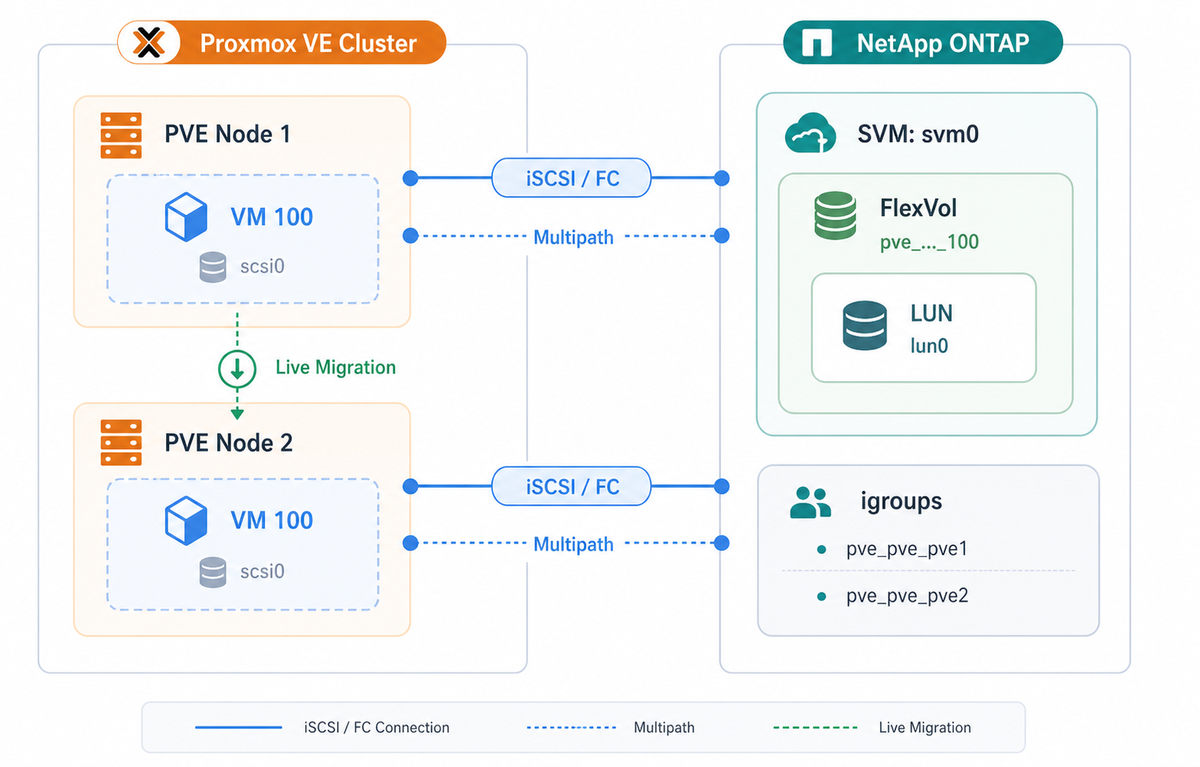
Object Mapping 物件對應
| Proxmox VE Object Proxmox VE 物件 | ONTAP Object ONTAP 物件 | Naming Pattern 命名規則 |
|---|---|---|
| Storage | -- |
User defined (e.g., netapp1)
使用者定義(例如 netapp1)
|
| VM Disk | FlexVol | pve_{storage}_{vmid}_disk{id} |
| VM Disk | LUN | /vol/{flexvol}/lun0 |
| Snapshot | Volume Snapshot | pve_snap_{snapname} |
| Proxmox VE Node | igroup | pve_{cluster}_{node} |
| Cloud-init | FlexVol | pve_{storage}_{vmid}_cloudinit |
| VM State | FlexVol | pve_{storage}_{vmid}_state_{snap} |
Module Architecture 模組架構
Multipath Safety Rules Multipath 安全規則
Rule 1: NEVER use multipath -F (capital F) 規則 1:絕對不要使用 multipath -F(大寫 F)
multipath -F flushes ALL unused multipath maps system-wide. If you have other storage (manual iSCSI LVM, other vendors, etc.) and there is no active I/O on it at the moment, it will be disconnected. Always use targeted flushing:
multipath -F 會清除系統上所有未使用的 multipath map。如果您有其他儲存(手動 iSCSI LVM、其他廠商等)且當時沒有 active I/O,該儲存會被斷開。請使用指定目標的清除:
# Identify stale WWIDs (look for "failed faulty" in all paths)
multipath -ll

# Flush ONE specific stale WWID (lowercase f)
multipath -f 3600a09807770457a795d5a7653705853
Rule 2: After editing multipath.conf, use restart not reload 規則 2:編輯 multipath.conf 後,使用 restart 而非 reload
# CORRECT - applies new settings AND flushes stale state
systemctl restart multipathd

# WRONG - only re-reads config, leaves stale maps in place
systemctl reload multipathd
Rule 3: Check your multipath.conf settings 規則 3:檢查您的 multipath.conf 設定
If your config contains any of these, the entire PVE node can hang when a LUN is deleted or becomes unavailable: 如果您的設定包含以下任何一項,當 LUN 被刪除或變得不可用時,整個 PVE 節點可能會當機:
| Setting 設定 | Risk 風險 | Fix 修正 |
|---|---|---|
no_path_retry queue |
I/O queues forever I/O 永久排隊 |
Change to no_path_retry 30
改為 no_path_retry 30
|
queue_if_no_path |
Same as above 同上 |
Remove from features line
從 features 行移除
|
dev_loss_tmo infinity |
Stale devices never removed 殘留裝置永遠不會被移除 |
Change to dev_loss_tmo 60
改為 dev_loss_tmo 60
|
Rule 4: v0.2.2+ handles cleanup automatically 規則 4:v0.2.2+ 自動處理殘留清理
You do not need to manually clean stale devices after upgrading to v0.2.2+. The plugin automatically detects and removes its own orphan devices in the background during normal storage status polling. It only touches WWIDs it created and never affects other storage. 升級至 v0.2.2+ 後不需要手動清理殘留裝置。Plugin 會在正常儲存狀態輪詢時,於背景自動偵測並移除自己產生的殘留裝置。只會處理自己建立的 WWID,不會影響其他儲存。
Supported Features Matrix 功能支援表
| Feature 功能 | Status 狀態 | Notes 備註 |
|---|---|---|
| Disk create/delete 磁碟建立/刪除 | Supported 支援 | FlexVol + LUN |
| Disk resize 磁碟調整大小 | Supported 支援 | Online resize supported 支援線上調整 |
| Snapshots 快照 | Supported 支援 | ONTAP Volume Snapshots |
| Snapshot rollback 快照倒回 | Supported 支援 | VM must be stopped VM 必須先停止 |
| Live migration 即時遷移 | Supported 支援 | Via shared iSCSI/FC access 透過共享 iSCSI/FC 存取 |
| Thin provisioning 精簡配置 | Supported 支援 | Default enabled 預設啟用 |
| Multipath I/O | Supported 支援 | Automatic configuration 自動設定 |
| Template | Supported 支援 | Convert VM to template 將 VM 轉為範本 |
| Linked Clone | Supported 支援 | Via NetApp FlexClone (instant, space-efficient) 透過 NetApp FlexClone(即時、節省空間) |
| Full Clone | Supported 支援 | Via qemu-img copy 透過 qemu-img 複製 |
| Full Clone from Snapshot 從快照完整複製 | Supported 支援 | Via temporary FlexClone + qemu-img 透過暫時 FlexClone + qemu-img |
| Backup (vzdump) | Supported 支援 | Via snapshot 透過快照 |
| RAM Snapshot (vmstate) | Supported 支援 | v0.1.7+ |
| LXC Container (rootdir) | Supported 支援 | v0.2.0+ |
| EFI Disk | Supported 支援 | v0.2.0+ |
| Cloud-init Disk | Supported 支援 | v0.2.0+ |
| TPM State | Supported 支援 | v0.2.0+ |
Troubleshooting 疑難排解
Common issues and their solutions. For a comprehensive guide, see docs/TROUBLESHOOTING.md in the repository. 常見問題及解決方案。完整指南請參閱 repository 中的 docs/TROUBLESHOOTING_zh-TW.md。
Quick Diagnostic Commands 快速診斷指令
# Check storage status
pvesm status

# Check PVE daemon logs
journalctl -xeu pvedaemon --since "10 minutes ago"

# Check iSCSI sessions
iscsiadm -m session

# Check multipath devices
multipathd show maps

# Check ONTAP API connectivity
curl -k -u username:password https://ONTAP_IP/api/cluster
Storage Not Active 儲存未啟用
Symptoms: Storage shows "inactive" in pvesm status. Cannot create VMs on storage.
症狀:在 pvesm status 中顯示 "inactive"。無法在該儲存上建立 VM。
Common Causes: 常見原因:
- Invalid credentials -- test with:
curl -k -u pveadmin:password https://192.168.1.100/api/cluster認證無效 -- 測試指令:curl -k -u pveadmin:password https://192.168.1.100/api/cluster - Network connectivity -- check:
ping <ontap-portal>andnc -zv <ontap-portal> 443網路連線問題 -- 檢查:ping <ontap-portal>及nc -zv <ontap-portal> 443 - SSL certificate issues -- temporarily disable:
pvesm set <storage-id> --ontap-ssl-verify 0SSL 憑證問題 -- 暫時停用:pvesm set <storage-id> --ontap-ssl-verify 0 - SVM not accessible or iSCSI service not enabled on the SVMSVM 無法存取或 SVM 上的 iSCSI 服務未啟用
Device Not Found After Create 建立後找不到裝置
Symptoms: Disk created successfully but device not appearing in /dev/.
症狀:磁碟建立成功但裝置未出現在 /dev/ 中。
Solutions: 解決方案:
# Rescan iSCSI sessions
iscsiadm -m session --rescan

# Reload multipath
multipathd reconfigure
multipath -v2
igroup Issues igroup 問題
Symptoms: LUN mapped but node cannot see the device. iscsiadm -m session shows active sessions but lsscsi shows no NETAPP devices.
症狀:LUN 已 map 但節點看不到裝置。iscsiadm -m session 顯示 active session 但 lsscsi 沒有 NETAPP 裝置。
Verify the node's iSCSI initiator IQN (from /etc/iscsi/initiatorname.iscsi) is listed in the correct igroup on ONTAP. Check with ONTAP CLI: igroup show -vserver <svm>.
確認節點的 iSCSI initiator IQN(來自 /etc/iscsi/initiatorname.iscsi)已列在 ONTAP 上正確的 igroup 中。ONTAP CLI 檢查:igroup show -vserver <svm>。
Hung Kernel Tasks (vgs blocked, D-state processes) Kernel 卡住(vgs 阻塞、D-state 行程)
Symptoms: vgs or other commands hang. ps aux shows processes in D state. PVE operations time out.
症狀:vgs 或其他指令卡住。ps aux 顯示 D state 的行程。PVE 操作逾時。
Root cause: Usually a stale multipath device with queue_if_no_path or no_path_retry queue. Any process that touches the device enters uninterruptible sleep (D-state).
根本原因:通常是設定了 queue_if_no_path 或 no_path_retry queue 的殘留 multipath 裝置。任何碰觸該裝置的行程都會進入不可中斷睡眠(D-state)。
Manual cleanup for stale devices with queue_if_no_path: 有 queue_if_no_path 的殘留裝置手動清理:
# 1. Disable queueing
multipathd disablequeueing map <wwid>
dmsetup message <wwid> 0 fail_if_no_path

# 2. Flush the specific device
multipath -f <wwid>

# 3. If step 2 fails, force remove
dmsetup remove --force --retry <wwid>
Cannot Delete Volume (LVM holders / "device is still in use") 無法刪除 Volume(LVM holders / 「裝置仍在使用中」)
Symptoms: Cannot delete volume: device is still in use (has holders). Common on PVE nodes upgraded from 7 to 8 to 9.
症狀:Cannot delete volume: device is still in use (has holders)。常見於從 PVE 7 升級至 8 再到 9 的節點。
Root cause: The host's LVM scanner auto-activated VGs found INSIDE VM disks (guest OS LVM). This happens when /etc/lvm/lvm.conf has no global_filter to exclude plugin multipath devices.
根本原因:主機的 LVM 掃描器自動 activate 了 VM 磁碟裡面的 VG(客體 OS 的 LVM)。這在 /etc/lvm/lvm.conf 沒有 global_filter 排除 plugin multipath 裝置時會發生。
Fix: 修復:
# Deactivate the guest VG on the host
vgchange -an <guest-vg-name>

# Long-term fix: add global_filter to /etc/lvm/lvm.conf
# global_filter = [ "r|/dev/mapper/3.*|" ]
Common Error Messages 常見錯誤訊息
| Error 錯誤 | Cause / Fix 原因 / 修復 |
|---|---|
unknown storage type 'netappontap' | Plugin not loaded. Reinstall and restart pvedaemon. Plugin 未載入。重新安裝並重啟 pvedaemon。 |
Failed to map LUN | ASA eventual consistency (v0.2.9 fixes with retry). Or igroup permissions issue. ASA 最終一致性問題(v0.2.9 已加入重試修復)。或 igroup 權限問題。 |
Cannot grow device files | Kernel did not see new LUN size. Fixed in v0.2.3+ (per-device rescan). Kernel 未偵測到新的 LUN 大小。v0.2.3+ 已修復(per-device rescan)。 |
trying to acquire lock... got timeout | D-state child blocking kernel lock. See "Hung Kernel Tasks" above. Upgrade to v0.2.5+. D-state child 佔住 kernel lock。見上方「Kernel 卡住」。請升級至 v0.2.5+。 |
sysfs write ... timed out | Writing to non-iSCSI SCSI host. Fixed in v0.2.5+. 對非 iSCSI SCSI host 寫入。v0.2.5+ 已修復。 |
Changelog 變更紀錄
Version history. For full details see CHANGELOG.md. 版本紀錄。完整內容請參閱 CHANGELOG_zh-TW.md。
systemctl reload (SIGHUP) to avoid restart stop-phase hangs on D-state children, but on many PVE versions SIGHUP re-exec does NOT reload the plugin's Perl modules — pvestatd keeps running the old code in memory (the PID stays the same) even though the new files are on disk. In the v0.2.21 rollout this made an installed fix appear to have no effect for over an hour. postinst now prints a prominent warning that the operator MUST run systemctl restart pvestatd on every node (and verify the PID changed). No Perl code change — lib/ is byte-identical to 0.2.21.
postinst:醒目的「restart pvestatd(而非 reload)」升級警告。postinst 用 systemctl reload(SIGHUP)重載 PVE 服務,以避免 restart 卡在 D-state 子程序,但在許多 PVE 版本上 SIGHUP re-exec **不會**重載外掛的 Perl 模組——即使新檔案已在磁碟上,pvestatd 仍在記憶體裡跑舊 code(PID 不變)。在 v0.2.21 部署中,這讓一個已安裝的修正一個多小時都看似沒生效。postinst 現在會印出醒目警告,告知操作者**必須**在每個節點執行 systemctl restart pvestatd(並確認 PID 已改變)。沒有 Perl code 變更——lib/ 與 0.2.21 逐位元組相同。
_cleanup_orphaned_devices() (run every ~10s poll on every node) called lun_get_wwid() once per LUN to build its alive-set — an N+1 REST storm (75 LUNs × N nodes ≈ 75·N calls every 10s) that overwhelmed ONTAP's management gateway (mgwd) into congestion collapse (capacity exhaustion, not a 429 rate limit). Fix: lun_list() already returns serial_number in one call, so the WWID is now computed locally via serial_to_wwid() — ~75 calls/poll → 0 extra, byte-identical alive-set (verified on real ONTAP). New test cleanup_load.pl 6/6; full regression 13/13 + 20/20 + 13/13 + 8/8.
殘留清理 N+1 REST 風暴修正(ONTAP 管理閘道負載)。客戶的 FAS(ONTAP 9.15.1P19)韌體升級後,管理 REST 變慢(~4s/請求)且間歇拒連——同叢集、同 plugin 的相關 ASA 9.14.1 沒事。根因:_cleanup_orphaned_devices()(每節點每 ~10s 輪詢都跑)為了建立 alive-set,對每顆 LUN 各打一次 lun_get_wwid()——N+1 REST 風暴(75 顆 × N 節點 ≈ 每 10s 75·N 個呼叫),把 ONTAP 管理閘道(mgwd)打進 congestion collapse(容量耗盡,非 429 速率限制)。修正:lun_list() 本來就在一次呼叫回傳 serial_number,改用 serial_to_wwid() 本地算 WWID——~75 calls/輪 → 0 額外,alive-set 逐位元組相同(真實 ONTAP 驗證)。新測試 cleanup_load.pl 6/6;完整回歸 13/13 + 20/20 + 13/13 + 8/8。
activate_storage's iSCSI discover/login loop had per-portal timeouts that bound each portal but not the loop's cumulative time — several reachable-but-hanging LIFs could still stall pvestatd. New ontap-activate-deadline (default 30s) caps the cumulative discover/login work: once spent AND at least one portal is up, remaining portals are deferred to a later activation. An in-progress login is never interrupted, and the loop never skips while zero paths are up. CLAUDE.md gains a "PVE Daemon Isolation (never wedge PVE)" rule. Unit test 8/8, simulator regression 13/13.
activate_storage iSCSI 登入預算(「絕不卡住 PVE」)。v0.2.19 的後續。v0.2.19 已界定 pvestatd 健康路徑上的 ONTAP REST 呼叫,但 activate_storage 的 iSCSI discover/login 迴圈,其 per-portal 逾時只界定單一 portal、不界定迴圈累積時間——數個「連得到卻在登入時 hang」的 LIF 仍可能拖住 pvestatd。新增 ontap-activate-deadline(預設 30s)界定 discover/login 累積工作量:一旦超過且已有至少一條路徑,剩餘 portal 延到下次 activation。進行中的 login 絕不中斷,尚未有路徑時絕不跳過。CLAUDE.md 新增「PVE Daemon Isolation(never wedge PVE)」規則。單元測試 8/8、模擬器 regression 13/13。
sd shadows the reused LUN-ID and the new map fails with error getting device (-EBUSY); a new topology-based reaper (list_netapp_scsi_paths() + _reap_stale_scsi_paths()) removes it with strict safety gates (vendor, no holders, alive-sibling/tracked-orphan evidence, 300s grace) and self-heals. (2) pvestatd timeout isolation: a degraded ONTAP previously stacked retrying calls into status update time (189s) and dragged sibling storages into inactive; the new ontap-status-timeout (default 5s, no retry) bounds the health path — measured 5.0s vs 32.0s. (3) HTTP keep_alive: reuse one TCP+TLS connection instead of a new handshake + re-auth per call, so a request storm no longer overwhelms ONTAP's mgmt gateway (field: 15s/req hammered vs 0.5s idle).
pvestatd 隔離 + 殘留路徑 reaper + 連線重用。三個韌性修正。(1) 殘留 SCSI 路徑 reaper:當 ONTAP 在未執行拆除的節點上重用已釋放的 LUN-ID,殘留 sd 會遮蔽被重用的 LUN-ID,新 map 以 error getting device (-EBUSY) 失敗;新增以拓樸為基礎的 reaper(list_netapp_scsi_paths() + _reap_stale_scsi_paths())以嚴格安全閘(廠商、無 holder、活著 sibling/追蹤殘留證據、300s 寬限期)移除並自我修復。(2) pvestatd 逾時隔離:退化的 ONTAP 先前把重試呼叫疊成 status update time (189s) 並把同節點其他儲存拖成 inactive;新增 ontap-status-timeout(預設 5s、不重試)界定健康路徑——實測 5.0s vs 32.0s。(3) HTTP keep_alive:重用同一條 TCP+TLS 連線而非每次新握手 + 重新認證,請求風暴不再打爆 ONTAP 管理閘道(現場:被打 15s/請求 vs 閒置 0.5s)。
LUN assignments on this target have changed: ONTAP reuses a freed SCSI LUN-ID for a different LUN after unmap, and any stale host sd device still bound to that address makes the new LUN unusable on that path. cleanup_lun_devices() previously removed only paths still in the multipath map (and did nothing when the map was already gone), leaving orphaned sd paths. Fix: get_scsi_paths_for_wwid() + a Step 8 sweep remove ALL NETAPP sd paths for the WWID even when the map is gone — vendor-gated, WWID-matched, and bounded by a wall-clock budget so a host with hundreds of devices cannot stall teardown.
清理時殘留 SCSI 路徑掃除。處理獨立的 kernel 訊息 LUN assignments on this target have changed:ONTAP 在 unmap 後把釋放的 SCSI LUN-ID 重用給不同 LUN,host 上任何仍綁在該位址的殘留 sd 裝置會讓新 LUN 在該路徑無法使用。cleanup_lun_devices() 先前只移除仍在 multipath map 內的路徑(map 已不在時則完全不動作),留下殘留 sd 路徑。修正:get_scsi_paths_for_wwid() + Step 8 掃除,即使 map 已不在也移除該 WWID 的所有 NETAPP sd 路徑——限定廠商、以 WWID 比對,並以 wall-clock 預算界定上限,讓擁有數百個裝置的 host 不會卡住拆除。
lun_list() snapshot and tore down the brand-new device when the freshly-created LUN was briefly missing from that query (ONTAP read-after-write lag), with no check of multipath path health. Fix: a path-health gate (multipath_path_health()) so the reaper NEVER removes a device that still has an active path; a 300s grace period for newly-tracked WWIDs; and lun_list() now follows ONTAP REST _links.next so a 1000+ LUN SVM never truncates the alive set (also applied to volume/igroup/snapshot/clone-children lists).
殘留清理路徑健康閘門 + LUN 清單分頁。在執行中的 VM 熱加硬碟可能立刻產生 I/O error:殘留清理以單一 lun_list() 快照建立「存活集合」,當剛建立的 LUN 暫時不在該查詢中(ONTAP read-after-write 延遲)時,便在未檢查 multipath 路徑健康的情況下拆掉全新裝置。修正:路徑健康閘門(multipath_path_health())讓 reaper 絕不移除仍有 active 路徑的裝置;對新追蹤 WWID 給 300 秒寬限期;且 lun_list() 現在會追隨 ONTAP REST 的 _links.next,讓 1000+ LUN 的 SVM 不會截斷存活集合(同樣套用於 volume/igroup/snapshot/clone-children 清單)。
_remove_temp_clone() now returns success when the ONTAP volume is already absent at entry, instead of dying at volume_clone_split. Without this, a stale tracking entry would cause the TTL background reaper to retry every 10s and spam the journal forever with "Failed to cleanup temp clone ...: Volume not found". Stale entries get untracked on the first poll after upgrade; noise stops on the next cycle.
Temp Clone 背景清理 idempotency 修正。_remove_temp_clone() 進入時若 ONTAP volume 已不存在,直接回成功而不在 volume_clone_split 階段 die。修正前,殘留 tracking entry 會讓 TTL 背景 reaper 每 10 秒重試一次到天荒地老,journal 持續吐「Failed to cleanup temp clone ...: Volume not found」。升級後第一次 poll 殘留 entry 就會被清掉,下個 cycle 起完全安靜。
multipath -f <wwid> — operators following those commands would tear down active VM disks. Fix: _cleanup_orphaned_devices() now builds a union of WWIDs tracked by all sibling netappontap storages and excludes them from orphan candidates.
跨儲存殘留偵測修正(正式環境事件)。同節點掛兩個以上 netappontap storage 時(例如 ASA + FAS),每個 storage 的殘留清理會把對方健康的 LUN 誤判為殘留,印 multipath -f <wwid> 建議 — 操作員若照做會拆掉跑著的 VM 磁碟。修正:_cleanup_orphaned_devices() 現在會建立所有相關 netappontap storage 追蹤 WWID 的聯集,並從殘留候選排除。
multipathd spammed "tur checker reports path is down" indefinitely after every backup. New shared helper _remove_temp_clone() mirrors free_image()'s 7-step pattern (capture slaves -> unmap -> cleanup_lun_devices -> remove sd* -> multipath_reload -> split -> wait -> delete). Both volume_snapshot_delete and _cleanup_temp_clones route through it. Section 24 hardened with mandatory host-side device residual assertions.
Temp Clone Host 端清理修正(v0.2.13 deploy 後一天客戶現場發現的 regression)。v0.2.13 修了 ONTAP 端的 snapshot 刪除,但 host 端 dm-multipath + sd* 路徑沒清。multipathd 在每次備份後持續洗版「tur checker reports path is down」。新增共用 helper _remove_temp_clone(),流程對齊 free_image() 的 7 步模式(抓 slave → unmap → cleanup_lun_devices → 移除 sd* → multipath_reload → split → wait → delete)。volume_snapshot_delete 和 _cleanup_temp_clones 兩個 call site 都統一走 helper。Section 24 強化加上必須的 host 端 device 殘留驗證。
volume_snapshot_delete() now detaches the dependent temp clone via volume_clone_split + wait + delete BEFORE deleting the snapshot, ensuring the owner reference is released on every ONTAP platform (real FAS and simulator behaved differently). Local in-use safety check via is_device_in_use prevents tearing down a temp clone that's still being read.
Snapshot 刪除清理修正(正式環境事件)。vzdump 對 CT 做 snapshot-mode 備份備份本身成功,但清理 snapshot 必失敗訊息「has not expired or is locked」— 因為讓 PVE 讀 snapshot 而建立的暫時 FlexClone 還在持有 parent snapshot。volume_snapshot_delete() 現在會在刪 snapshot 之前先透過 volume_clone_split + wait + delete 解除暫時 clone,確保 owner reference 在所有 ONTAP 平台都釋放(實機 FAS 與 simulator 行為不同)。透過 is_device_in_use 做本機 in-use 安全檢查,避免拆掉正在被讀取的 temp clone。
activate_storage() now TCP-probes every iSCSI LIF before invoking iscsiadm. Pre-fix behaviour stalled 30s (discovery) + 60s (login) per unreachable LIF, cascading via pvestatd polls into web UI hangs. New probe_portal() helper uses bounded IO::Socket::INET connect. New option ontap-portal-probe-timeout (0..30, default 2). Sibling-pattern audit from jt-pve-storage-purestorage v1.1.9.
iSCSI Portal TCP 預先檢查。activate_storage() 現在會在呼叫 iscsiadm 之前先用 TCP 確認 LIF 是否可達。修正前每個不通的 LIF 會吃 30 秒(discovery)+ 60 秒(login),透過 pvestatd 輪詢連鎖造成 web UI 凍結。新增 probe_portal() helper 用帶上限的 IO::Socket::INET 連線。新選項 ontap-portal-probe-timeout(0..30,預設 2)。修正來源:相關專案 jt-pve-storage-purestorage v1.1.9 的同類型稽核。
iscsi_get_lifs_with_home_node() API returns LIF metadata for HA validation. Documentation corrected.
SAN LIF 冗餘偵測修正。NetApp 原廠確認後:SAN (iSCSI/FC) LIF 在 takeover 時不會自動遷移,只有 NAS LIF 會。路徑切換靠 host MPIO + ALUA。外掛現在會偵測「所有 LIF 都在同一 home_node」的設定錯誤(單一 controller 故障即全斷風險)。新增 iscsi_get_lifs_with_home_node() API 回傳 LIF metadata 供 HA 驗證。文件已修正。
lun_map() failing with "LUN not found" on NetApp ASA systems due to ONTAP internal propagation delay after lun_create(). Now retries UUID lookup up to 5 times with 1-second intervals.
ASA 最終一致性修復。修復 lun_map() 在 NetApp ASA 系統上因 lun_create() 後 ONTAP 內部傳播延遲而回報 "LUN not found"。現在會重試 UUID 查詢最多 5 次,每次間隔 1 秒。
alloc_image() TOCTOU race retry (now bounded loop, max 5). Removed all multipath -F recommendations. Fixed bare glob() without alarm timeout.
程式碼審查修復 Release。修復殘留清理無條件 untrack WWID。修復 alloc_image() TOCTOU race retry(改為有界迴圈,最多 5 次)。移除所有 multipath -F 建議。修復 bare glob() 缺少 alarm timeout。
is_device_in_use() blocking ALL volume deletions on systems with kpartx partition scanning. Added kpartx -d cleanup step.
kpartx Partition Holder 修復。修復 is_device_in_use() 在有 kpartx partition 掃描的系統上擋住所有 volume 刪除。新增 kpartx -d 清理步驟。
systemctl reload (SIGHUP) to avoid D-state stop-phase hang. Added lvm.conf global_filter detection. Detailed is_device_in_use error messages with LVM VG names and fix commands.
Postinst 服務 Reload + Operator UX。新增 pvestatd 到服務 reload 清單。改用 systemctl reload (SIGHUP) 避免 D-state stop 階段卡住。新增 lvm.conf global_filter 偵測。詳細的 is_device_in_use 錯誤訊息,含 LVM VG 名稱與修復指令。
rescan_scsi_hosts() writing to non-iSCSI hosts (smartpqi, USB, etc.), causing D-state cascades and node hangs. Now sources host list from /sys/class/iscsi_host/.
非 iSCSI SCSI Host 掃描修復(HPE ProLiant 正式環境事件)。修復 rescan_scsi_hosts() 對非 iSCSI host(smartpqi、USB 等)寫入,導致 D-state 連鎖與節點當機。改從 /sys/class/iscsi_host/ 取得 host 清單。
Older versions (v0.2.4 -- v0.1.0) 更早版本(v0.2.4 -- v0.1.0)
clone_image() TOCTOU race and missing lun_unmap_all() in cleanup. Added _translate_limit_error() for operator-friendly ONTAP error messages. Removed dead code get_multipath_wwid(). Pre-snapshot buffer flush.
Cleanup 路徑強化 + 並行 + Operator UX。修復 clone_image() TOCTOU race 及 cleanup 缺少 lun_unmap_all()。新增 _translate_limit_error() 提供 operator 友善的 ONTAP 錯誤訊息。移除無用程式碼 get_multipath_wwid()。Snapshot 前 buffer flush。
Acknowledgments 致謝
Special thanks to NetApp for generously providing the development and testing environment that made this project possible. 特別感謝 NetApp 慷慨提供開發測試環境,使本專案得以順利完成。